





Results 1 to 15 of 30
 LinkBack URL
 About LinkBacks
-
12-01-2010 07:52 PM #1
 CHR Member

- Join Date
- Dec 2006
- Location
- Sacramento
- Car Year, Make, Model: 1928 ford truck
- Posts
- 24
trying to upload pics w/ no luck, help please
Could someone help me to upload some pics of my build?
-
Advertising

- Google Adsense
- REGISTERED USERS DO NOT SEE THIS AD
-
12-01-2010 08:15 PM #2
CHR Member/Contributor
- Join Date
- Sep 2007
- Location
- Gardner, KS
- Car Year, Make, Model: '33 HiBoy Coupe, '32 HiBoy Roadster
- Posts
- 11,245
Not sure if it will help or not, but I reduce my pics using EZ Thumbnails, load them onto PhotoBucket, and then post the url files to the thread I want them in using Manage Attachments. If you're wanting them in the gallery I cannot help you Originally Posted by modela fever


Roger
Enjoy the little things in life, and you may look back one day and realize that they were really the BIG things.
-
12-01-2010 08:15 PM #3
CHR Member
- Join Date
- Jan 2006
- Location
- fort myers
- Car Year, Make, Model: '27 ford/'39 dodge/ '23 t
- Posts
- 11,033
I'm like the most computer dumb person alive, but I'll try to help. This forum is a lot easier to post pictures on than most others I am on. You don't need to first put your pictures into something like photobucket, you can go direct to where you store your pictures and post them here.
1) First, make sure your pictures are something like 640 x 480 so they don't take up the whole screen and make it hard for people to view.
2) After you do your text, simply go to the box at the bottom that reads "manage attachments" and click on it. A box will open that says "brouse" click on that box.
3) Now you will probably get to the area where you store your pictures, or at least an area where you can select the area where they are kept. Open that area up.
4) Select the picture you want by clicking on it, then click on "open" at the bottom of the box. The next box that will open has "upload" in one box, click on it. That picture is now downloaded to your posting.
5) If you want more than one picture the "brouse" box can be clicked on again and you can repeat steps 3 and 4 again. You can do this for up to 5 pictures.
6) When you have all the pictures you want to post, close out the box that had "brouse" in it. You will then see your post with the pictures listed as text, not pictures yet. If you want to check them you can click on "Preview Post", and if it is ok you can hit "submit."
Try a test picture in this thread and see if it works for you.
DonLast edited by Itoldyouso; 12-01-2010 at 08:21 PM.
-
12-01-2010 08:34 PM #4
CHR Member
- Join Date
- Jul 2008
- Location
- Tampa Bay area
- Car Year, Make, Model: 32 Ford 3w Hi-Boy Project
- Posts
- 851
Don, for someone that says he's "the most computer dumb person alive", that was an excellent tutorial. I especially liked tip #1.
Mike
-
12-01-2010 08:42 PM #5
CHR Member
- Join Date
- Dec 2006
- Location
- Sacramento
- Car Year, Make, Model: 1928 ford truck
- Posts
- 24
I will give it a try, looks like I need to resize my pics, hopefully that don't give me no problems, any advise?
-
12-01-2010 09:04 PM #6
CHR Member
- Join Date
- Jan 2006
- Location
- fort myers
- Car Year, Make, Model: '27 ford/'39 dodge/ '23 t
- Posts
- 11,033
What size are your pictures? Up to 800 wide seem ok, but are on the edge of being too big.
Don
-
12-01-2010 09:44 PM #7
CHR Member
- Join Date
- Dec 2006
- Location
- Sacramento
- Car Year, Make, Model: 1928 ford truck
- Posts
- 24
They are 3264 x 2448 and I am having a hell of a time resizing. I'll keep trying.
-
12-01-2010 10:02 PM #8
CHR Member
- Join Date
- Jan 2006
- Location
- fort myers
- Car Year, Make, Model: '27 ford/'39 dodge/ '23 t
- Posts
- 11,033
What I do is put my large ones into Photobucket and then use their edit feature to resize them to 640 x 480. Then I put them back in my pictures at that new size. I'm sure some of our computer saavy guys can give you a better way though.
Don
-
12-02-2010 01:59 AM #9
CHR Member
- Join Date
- Apr 2009
- Location
- watford
- Car Year, Make, Model: 26T Coupe, 32 Roadster, 41 Willys Coupe
- Posts
- 2,363
I think this is the easiest way in the world, first download Shrinkpic from the net free Here http://www.onthegosoft.com/shrink_pic.htm
This sits on your toolbar and shrinks any pics your upload or email automatically, great !!!
Then get yourself a Photobucket account, again its free and simple to use. Here http://photobucket.com/
Once you have your pics up under each pic hover the mouse pointer over it and you will find a IMG code at the bottom of the box, click this code and it will say COPIED then right click in your posting and select paste, thats it job done !!!Its aweful lonesome in the saddle since my horse died.
-
12-02-2010 06:55 AM #10
CHR Member
- Join Date
- Nov 2007
- Location
- Where the Redwoods Meet The Sea
- Car Year, Make, Model: 26 T Tudor, '57 VW ragtop
- Posts
- 150
[QUOTE=Itoldyouso;
1) First, make sure your pictures are something like 640 x 480 so they don't take up the whole screen and make it hard for people to view.
I do that, they are sized to 640x480, and they STILL come out super gigantic... Look at my "26Tudor" build thread....
?????
-
12-02-2010 07:45 AM #11
CHR Member/Contributor
- Join Date
- Sep 2007
- Location
- Gardner, KS
- Car Year, Make, Model: '33 HiBoy Coupe, '32 HiBoy Roadster
- Posts
- 11,245
In your "26Tudor" build thread the two photos in post #1 are 2560x1704 pixels, and the one in post #6 is 1200x799 pixels. Right click the photo, click "Properties" and it tells the tale... Originally Posted by 26Tudor
Last edited by rspears; 12-02-2010 at 07:48 AM.
Roger
Enjoy the little things in life, and you may look back one day and realize that they were really the BIG things.
-
12-02-2010 08:44 AM #12
CHR Member
- Join Date
- Apr 2001
- Location
- Salado
- Car Year, Make, Model: 32, 40 Fords,
- Posts
- 10,898
...................Last edited by Bob Parmenter; 12-02-2010 at 01:23 PM.
Your Uncle Bob, Senior Geezer Curmudgeon
It's much easier to promise someone a "free" ride on the wagon than to urge them to pull it.
Luck occurs when preparation and opportunity converge.
-
12-02-2010 09:13 AM #13
CHR Member
- Join Date
- Jun 2007
- Location
- New Market
- Posts
- 2,590
all my digital cameras are set at 800/600 so iv`e no need to resize ..can you set you picture size beforehand ?
-
12-02-2010 10:45 AM #14
CHR Member
- Join Date
- Dec 2006
- Location
- Sacramento
- Car Year, Make, Model: 1928 ford truck
- Posts
- 24
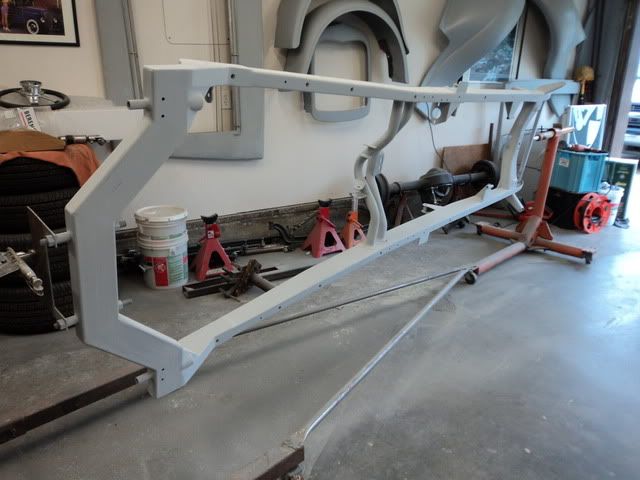
Ok here we go, let's see if this works???
-
12-02-2010 10:50 AM #15
CHR Member
- Join Date
- Dec 2006
- Location
- Sacramento
- Car Year, Make, Model: 1928 ford truck
- Posts
- 24
I just changed the settings on my camara so shouldn't be a problem for future pictures I take.
 Reply With Quote

Posting Permissions
- You may not post new threads
- You may not post replies
- You may not post attachments
- You may not edit your posts

i've enjoyed the years here . made a lot of friends. most who have left. i see no reason to continue with this so hope to see you somewhere else. i dont think this site will ever be back. it's lived...
Dead!